
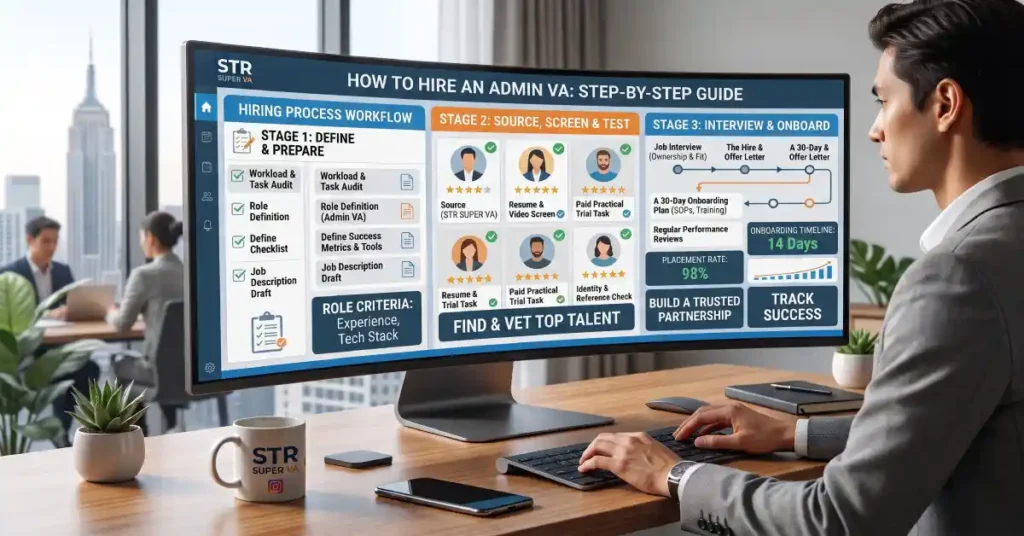
If your inbox, calendar and spreadsheets are eating the hours you should spend growing your business, it’s time to hire an admin virtual assistant. Done well, it’s one of the fastest ways to get your time back without the cost and overhead of a full-time employee. Done badly, it means weeks of wasted onboarding and a VA who never quite gets up to speed.
This guide walks you through how to hire an admin virtual assistant the right way, from auditing your workload and choosing a hiring model to interviewing, onboarding and measuring results. Whether you’re a solopreneur, a small business owner or a growing team, you’ll finish with a clear process you can follow.
Why Businesses Hire an Admin Virtual Assistant
Administrative work is necessary, but it rarely grows revenue. Most owners hire help for the same reasons:
- Email and scheduling take hours every day
- Follow-ups, data entry and invoicing fall through the cracks
- They’re doing $15-an-hour work at a $100-an-hour opportunity cost
- A full-time in-house hire is too expensive or too much commitment right now
An admin virtual assistant is a remote professional who takes over those recurring tasks. You get capacity on demand, usually at a fraction of the cost of an employee, with no desk, equipment or payroll to manage.
Step 1: Audit Your Time and List the Tasks to Delegate
Before you hire an admin virtual assistant, you need to know what you’re hiring them to do. Skipping this step is the most common reason a VA relationship fails.
For one week, write down everything you do in 30-minute blocks. Then sort each task into three groups:
- Delegate now: repetitive, rule-based work such as inbox sorting, scheduling, data entry, CRM updates, expense tracking and document formatting
- Delegate later: tasks that need documenting first, such as client onboarding or reporting
- Keep: sales conversations, strategy, key relationships and anything that truly needs your judgment
A good test: if you could write the steps on one page, someone else can do it. If you’re not sure what’s realistic to hand off, our guide to what an admin virtual assistant actually does lists the full range of tasks, so you can match it against your own list.
Aim for 5 to 10 recurring tasks you’d happily never touch again. That list becomes the foundation of your job scope.
Step 2: Decide What Role You Actually Need
Not every assistant is the same, and hiring the wrong type wastes money. Match the role to your task list:
| Role | Best for | Typical tasks |
|---|---|---|
| Admin virtual assistant | Day-to-day operations | Email, calendar, data entry, CRM, documents, invoicing |
| Executive virtual assistant | Founders and senior leaders | Priority management, stakeholder communication, high-level coordination |
| Specialist VA | One skill area | Bookkeeping, social media, customer support, marketing |
| Operations manager | Process and team oversight | SOPs, project management, team coordination |
If most of your list is inbox, scheduling and data work, you need an admin VA. If you’re delegating decisions and strategy support, look at an executive VA instead.
Step 3: Choose Your Hiring Model
You have three main options for building your support, and each trades cost against effort and risk.
| Model | Pros | Cons |
|---|---|---|
| Freelancer (marketplaces or referrals) | Flexible, often the lowest hourly rate | You do all the vetting, training and replacement yourself; availability can change suddenly |
| VA agency or company | Pre-vetted and trained VAs, management and replacement support, faster start | Higher rate than the cheapest freelancers |
| In-house employee | Full control, on-site if needed | Salary, benefits, equipment and recruiting costs; fixed hours |
For most small businesses, a freelancer works for simple, one-off tasks, while a VA agency is the safer choice when you need reliability, ongoing quality checks and someone to step in if the match isn’t right. That’s the gap managed services like our admin virtual assistant services are built to fill.
Step 4: Set Your Budget and Hours
Cost depends on a few factors:
- Experience and skill level: a VA who can manage a CRM costs more than one doing basic data entry
- Hours: part-time, full-time or a custom block
- Hiring model: agencies include vetting, training and management that you’d otherwise handle yourself
- Tools and specialization: knowledge of HubSpot, Asana or ClickUp can raise rates
Start smaller than you think you need. Many owners begin part-time, prove the workflow, then scale hours as they trust the process. Remember to budget your own time too: the first few weeks require training and feedback.
When you compare prices, compare what’s included. A cheap hourly rate with no vetting, no backup and no oversight often costs more once you factor in your time.
Step 5: Write a Clear Job Scope
A vague brief gets vague results. Write a one-page scope that covers:
- Responsibilities: the 5 to 10 tasks from Step 1, written as outcomes (for example, inbox cleared and prioritized by 10 a.m.)
- Tools: Google Workspace, Microsoft 365, Slack, Asana, ClickUp, HubSpot or whatever you use
- Hours and time zone: required overlap, response times and holidays
- Communication: how you’ll talk (Slack, email, Loom videos) and how often you’ll check in
- Reporting: daily or weekly updates on what was done
- Confidentiality: NDA and data-handling expectations
This document doubles as your interview guide and your onboarding plan.
Step 6: Source and Shortlist Candidates
Once your scope is ready, you can look for candidates in a few places:
- VA agencies and companies: the quickest route to pre-vetted candidates
- Freelance marketplaces: a large pool, but expect to sort through many applicants
- Referrals: ask other business owners who they use
- LinkedIn and job boards: slower, but useful if you want a very specific skill set
Shortlist two to four candidates who match your tools, time zone and communication style. Look for relevant experience, clear written English, evidence of reliability (reviews, references, retention) and comfort with the tools in your scope.
Step 7: Interview and Test Before You Commit
Resumes tell you little. A short interview plus a small paid test tells you a lot. When you interview, ask questions like:
- Walk me through how you would organize a chaotic inbox on day one.
- How do you prioritize when three urgent requests arrive at once?
- Which tools have you used, and how long have you used them?
- Tell me about a mistake you made on a client project and how you handled it.
- How do you handle confidential information and passwords?
- What does a good first week look like for you?
- What hours can you reliably cover, and how fast do you respond?
- Can you share a reference from a client you’ve supported long term?
Then assign a paid test task that reflects the real work, such as drafting replies to five sample emails, building a meeting schedule across time zones or cleaning a messy spreadsheet. Judge accuracy, speed, follow-through and how many questions they ask. Good questions are a positive sign.
Red flags: slow or vague replies, no questions about your business, overpromising, no references, and unwillingness to do a paid test.
Step 8: Set Up Access and Security
Before your VA starts, set up access safely:
- Use a password manager so you never share passwords in plain text
- Grant delegate access to email and calendar instead of handing over logins where possible
- Turn on two-factor authentication on key accounts
- Give access only to what’s needed for the role, and add more later
- Have a signed NDA or confidentiality agreement in place
This protects your business and makes it easy to revoke access if the relationship ends.
Step 9: Onboard Your Admin Virtual Assistant
The first 30 days decide whether the hire works long term. Treat onboarding as a project:
- Week 1: share your scope, introduce your tools and walk through two or three core tasks live. Record Loom videos so the training is reusable.
- Week 2: move to supervised work. Review output daily and give specific feedback.
- Week 3: add more tasks and agree on your communication rhythm and reporting format.
- Week 4: hold a review. What’s going well? What needs a clearer process? What can you hand off next?
Write simple SOPs as you go: a checklist for each recurring task. They make your VA faster, and they protect you if you ever need to replace or add someone.
Step 10: Measure Results and Adjust
Track a few simple measures rather than a complicated dashboard:
- Turnaround time: how quickly tasks are completed
- Accuracy: how often work needs correction
- Response time: how fast your VA replies during working hours
- Hours saved: time you’ve gotten back each week
- Your confidence: do you trust the work without double-checking?
Hold a short weekly check-in and a monthly review. If results are strong, add hours or tasks. If something is off, fix the process or the match early, before it becomes a habit.
Common Mistakes When You Hire an Admin Virtual Assistant
- Hiring on price alone: the cheapest option often costs more in rework and turnover
- Delegating without documentation: if the process lives only in your head, no one can follow it
- Handing over everything at once: start with a few tasks and expand
- Skipping the paid test: interviews can’t show you how someone really works
- Micromanaging or never giving feedback: aim for clear expectations and regular, specific input
- Sharing passwords insecurely: use proper access controls from day one
Ready to Hire an Admin Virtual Assistant?
Hiring well takes a clear scope, the right model and a structured start. If you’d rather skip the sourcing and vetting, STR Super VA matches you with a trained admin VA who already knows tools like Google Workspace, Asana, ClickUp and HubSpot. You interview them first, and you can work with us part-time or full-time.
Ready to start? Explore our admin virtual assistant services, fill out our short form to get matched or call us at 866-328-9826 to talk through your workload.
Frequently Asked Questions
How much does it cost to hire an admin virtual assistant?
Cost varies with the VA’s experience, the hours you need and whether you hire a freelancer or an agency. Part-time plans cost less than full-time, and specialized skills like CRM management raise the rate. Compare what’s included, not just the hourly price, since vetting, training and replacement support all affect the real cost. Contact us for a quote based on your workload.
How long does it take to hire an admin virtual assistant?
Hiring on your own through a marketplace can take several weeks once you factor in posting, screening, interviews and test tasks. With an agency that pre-vets candidates, you can be matched and onboarded much faster. Our process takes about 48 hours from your discovery call to getting started.
What tasks can an admin virtual assistant do?
An admin VA handles email and inbox management, calendar scheduling, data entry, CRM updates, document preparation, research, customer follow-ups, invoicing and expense tracking. See the full list of admin virtual assistant tasks for examples and ideas on what to delegate first.
Should I hire a freelance admin virtual assistant or use an agency?
A freelancer can suit small, simple tasks if you’re comfortable vetting and managing them yourself. An agency is usually better when you want reliability, pre-trained VAs, ongoing quality checks and a backup if the match isn’t right. The right choice depends on your budget, how much time you can spend on management and how critical the work is.
Where can I hire a reliable admin virtual assistant?
You can hire through VA agencies, freelance marketplaces, referrals from other business owners or LinkedIn. Agencies tend to offer the most consistent quality because candidates are vetted and trained before you meet them. Whichever route you choose, interview your shortlist and run a paid test task before committing.
Is hiring an admin virtual assistant worth it for a small business?
For most small businesses, yes. If admin work takes hours you could spend on sales, clients or strategy, a part-time VA often pays for itself in recovered time. Start with a small set of well-defined tasks, measure the results and scale up as you see the benefit.