An admin virtual assistant manages your inbox, calendar, documents, data, and daily follow ups so you can focus on higher value work. As a business owner, you likely drown in email, scheduling, and repetitive administrative work every single day. Understanding specific admin virtual assistant tasks is the first step to buying back your time.
In 2026, an administrative virtual assistant is a remote, software based professional focused on handling your repeatable workflows. This is especially vital for short term rental owners and small business operators who wear too many hats. Instead of hiring a full time employee for a physical office, you get dedicated digital help.
Modern virtual admin support also includes working with simple automation and basic AI tools to speed up routine tasks. This makes them faster and more efficient than ever before. You can explore our admin virtual assistant services to see how this looks in practice. To see if an admin VA is right for you, it helps to start with what they actually do all day.
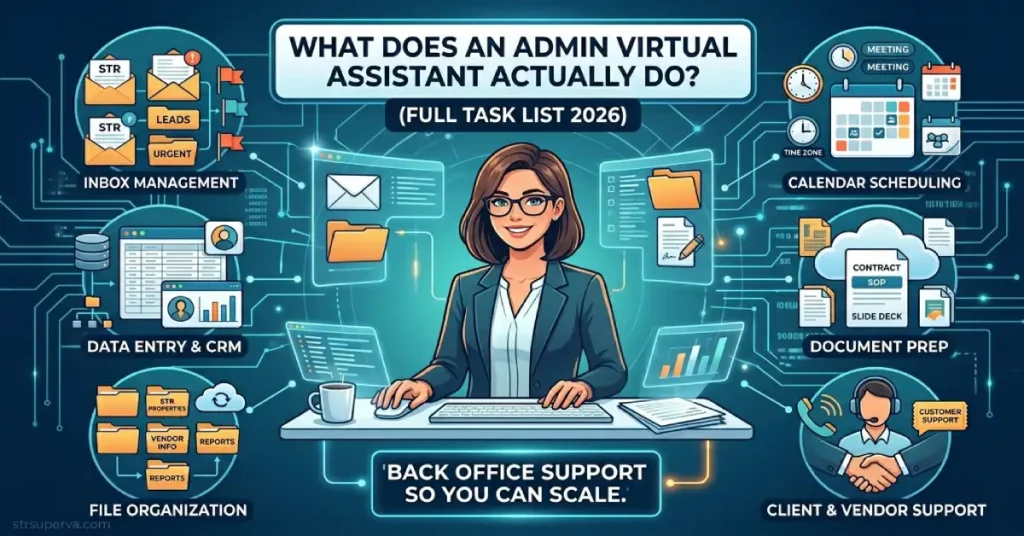
Admin virtual assistant tasks cover email, calendar, documents, data entry, reports, and daily follow ups. In 2026, they also help with CRM updates, basic bookkeeping, simple automations, and vendor or client coordination. STR owners can pair an admin VA with an operations VA to cover both back office and guest facing work seamlessly.
What is an admin virtual assistant in 2026?
An admin virtual assistant is a remote professional who handles your core office tasks like inbox management, scheduling, documents, and reporting using cloud tools. They essentially replace or support a traditional in office administrator.
They use familiar tools like Gmail, Outlook, Google Calendar, Slack, Zoom, Google Drive, Microsoft 365, and basic CRMs to run your back office. Because they work remotely, they usually work part time or full time for specific clients. This setup makes them incredibly cost effective for STR owners, solopreneurs, and small teams.
Key characteristics of an admin VA in 2026 include:
- Remote work capability, often across different time zones.
- High comfort levels with digital calendar and email tools.
- The ability to follow and actively improve standard operating procedures.
- Familiarity with spreadsheets, data entry, and simple databases.
- Frequent use of basic AI tools to speed up drafting and online research.
The next sections break their tasks into practical groups you can use as a delegation checklist.
Core admin virtual assistant tasks: email, calendar, and communication
The core admin virtual assistant tasks are managing your inbox, calendar, and day to day communication so you are not stuck in your email all day. Controlling your schedule is the fastest way to regain your focus.
Email management includes sorting messages, applying labels, drafting routine replies, turning important emails into tasks, and setting up automated filters. Your VA keeps the noise out so you only see what matters. Calendar management involves booking meetings, avoiding time conflicts, sending reminders, and managing tricky time zone differences.
Communication tasks cover answering simple client inquiries, confirming upcoming appointments, and sending quick follow up notes. This ensures your contacts feel heard without you typing every single reply.
Example core tasks include:
- Zeroing your inbox to a small number of important emails each day.
- Creating and updating calendar invites with the correct video links.
- Sending prep materials before a call and brief recaps after.
- Keeping a running log of important calls or messages in a shared spreadsheet.
Once email and time are under control, the next gains come from delegating document, data, and file management.
Back office admin tasks: documents, data entry, and file organization
Admin virtual assistants also handle the back office work you rarely have time for, like updating spreadsheets, organizing files, and preparing simple reports. These are the crucial operational tasks that keep a business organized but do not generate revenue directly.
Document creation involves drafting and formatting content in Google Docs, Word, and PowerPoint. Your VA can update templates, polish slide decks, and format internal guides. Data entry and database upkeep are also huge time savers. A back office VA can update spreadsheets, clean up your CRM, and maintain internal project trackers.
File organization is another major relief for busy owners. Your VA can restructure your Google Drive, enforce strict naming conventions, build logical folder structures, and manage access permissions for your team.
| Area | Example admin VA task | Benefit for you |
| Data entry | Updating lead or owner details in CRM | Clean records for sales and reporting |
| Document prep | Formatting contracts, SOPs, and slide decks | Faster, more polished client materials |
| File organization | Structuring Drive folders and archives | Easier to find what you need in minutes |
| Reporting | Pulling weekly KPIs into a simple spreadsheet | Quick snapshot of performance without digging |
Admin VAs also support front of house processes like customer support and appointment workflows.
Client, owner, and vendor support tasks an admin VA can handle
Many admin virtual assistants also provide light customer, owner, and vendor support by triaging requests and keeping everyone updated. They act as a helpful filter between you and the outside world.
They answer basic customer or owner questions via email or chat by following your approved templates. If a complex issue arises, they log the details, tag the right internal person, and follow up until the problem is resolved.
They also coordinate closely with your vendors. This includes sending purchase orders, tracking invoices at a basic level, and keeping vendor records accurate. For hosts looking to scale, an STR admin virtual assistant handles the business side while you focus on property acquisition.
Specific STR flavored support tasks include:
- Sending monthly performance summaries to property owners, using numbers your short term rental virtual assistant pulls.
- Updating owner contact information and specific communication preferences.
- Tracking local vendor contact lists, W9 tax forms, and basic contract renewal dates in a secure spreadsheet.
The next section will cover more advanced admin tasks like research, reporting, automation, and simple finance support.
Advanced admin VA tasks in 2026: research, reporting, and simple automations
In 2026, experienced admin virtual assistants often take on higher value work like research, reporting, and basic workflow automation. They evolve from simple task doers into proactive problem solvers.
Online research is a massive help. Your VA can research new vendors, software tools, local competitors, or content ideas, and summarize their findings in a clear document. They also help with recurring reports. This includes building weekly KPI dashboards, creating simple slide decks, and tracking STR specific performance metrics.
Simple automation support is becoming standard. A mature VA can help set up rules in Gmail, build basic connections in Zapier, or configure calendar booking tools, even if they are not full automation engineers.
A mature admin VA can grow into these advanced tasks:
- Build and maintain a clean contact list from inbound emails and calls.
- Draft simple standard operating procedures as they learn your workflows.
- Support basic bookkeeping tasks such as matching receipts and tracking expenses, if you provide clear instructions.
You can view our dedicated admin virtual assistant services to learn exactly what our highly trained team offers. The final decision often comes down to which admin tasks bring the biggest time savings for you personally.
How to decide which admin virtual assistant tasks to delegate first
You should delegate the admin tasks that steal your time daily but do not truly need your judgment or expertise. Identifying these tasks is the secret to successful outsourcing.
This usually means starting with high volume, low complexity tasks like inbox triage and calendar management. If a task happens every single day and takes no special strategic thought, it belongs to your assistant.
Predictable workflows that can be described in a short standard operating procedure are also perfect. Things like file naming, weekly reports, and data entry fit this description perfectly.
Follow this simple step list to start delegating:
- Track your admin time for one week in a notebook or time tracking app.
- Highlight repetitive tasks that feel draining but are easy to teach.
- Write a two to three step outline for each of those highlighted tasks.
- Pick three to five tasks as your initial VA bundle and hand them off with clear SOPs.
Start small rather than dumping everything on them at once. When you are ready to take the next step, you can easily get started with an admin virtual assistant to reclaim your schedule. The next section answers common questions people search about admin VAs.
Frequently Asked Questions
What tasks does an admin virtual assistant usually handle?
An admin virtual assistant handles email management, calendar booking, document formatting, data entry, reporting, and daily follow ups. They also manage digital file organization and can provide light customer support, vendor coordination, and basic online research to keep your daily operations running smoothly.
Can an admin virtual assistant handle bookkeeping and invoicing?
Many admin VAs can help with basic bookkeeping tasks such as issuing invoices, tracking payments, and matching business receipts. However, complex accounting, tax preparation, and financial strategy work should always stay with a professional bookkeeper or a licensed CPA.
How many hours per week do I need an admin VA?
A solo operator usually needs 5 to 10 hours per week, while a small team might need 10 to 20 hours. It is best to start with fewer hours to hand off core tasks, and then grow their hours once trust is firmly built.
What tools should I give my admin virtual assistant access to?
You should give them access to your email, calendar, document storage, chat tools, and any CRM or project management software they will update. Always set clear permission levels and share passwords securely using encrypted tools like LastPass or 1Password.
How do I train an admin virtual assistant on my processes?
First, record your screen while doing the tasks yourself. Turn those recordings into simple standard operating procedures. Review the steps together on a video call, and let your VA practice the tasks while you give helpful feedback during their first week.
Can an admin virtual assistant help with my short term rentals too?
Yes, many admin VAs can easily support short term rental back office work such as generating owner reports, updating vendor lists, and basic data tracking. They work perfectly alongside a guest facing VA. If you prefer to talk through it, call 866-328-9826 to discuss what to delegate first.
Conclusion
An admin virtual assistant covers the silent, invisible part of your work day, including your inbox, calendar, files, data, and daily follow ups. These are the repetitive operational tasks that drain your energy but can usually be documented and delegated safely.
To succeed with a virtual assistant, group your tasks by category and start with repetitive, low risk work. Use clear standard operating procedures and secure digital tools to set them up for success from day one. You do not need to delegate your entire business, just the parts that slow you down.
As a practical next step, list everything you touched in your inbox and calendar today. Circle five tasks that did not really require your personal expertise, and consider handing those over. Explore our admin virtual assistant services today, and get started with STR Super VA to scale your business the smart way.